The auto WhatsApp number saver that syncs straight to Google Contacts.
If you’re manually saving every new WhatsApp number, LeadSync can scan visible numbers from your WhatsApp Web chat list or an opened group-member list when you choose Scan & Save. It saves new numbers straight into Google Contacts — with a name prefix, auto-sequencing, and duplicate detection. They sync to your phone automatically.
Current scope: phone numbers visible in the WhatsApp Web chat list or an opened group-member list. Hidden numbers and message sending are not supported.
- Read-only, on your device
- Automatic duplicate detection
- Free for your first 35 contacts
- Read-onlyNever sends messages
- On your deviceNo contact data sent to LeadSync
- Google People APIYour own sign-in
- Syncs to phoneAndroid & iPhone
Watch LeadSync save unknown chat numbers in one click
See the WhatsApp Web chat-list workflow to Google Contacts — group-member lists are also supported in version 1.3.0.
Accessible demo summary
- Open WhatsApp Web and connect the Google account that should receive contacts.
- Display the chat list or an opened group-member list, then choose Scan & Save.
- LeadSync checks visible numbers, skips duplicates, applies the chosen naming sequence, and creates new Google Contacts.
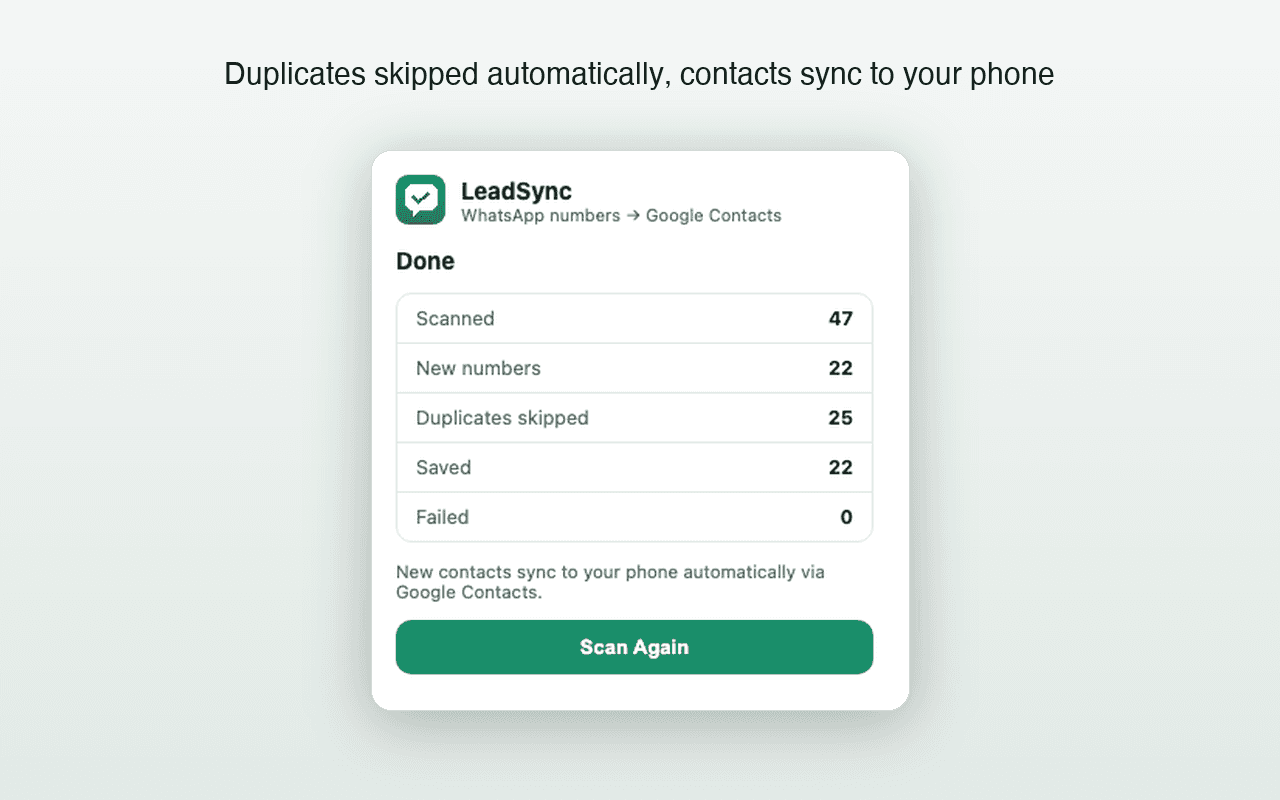
- The result reports scanned, duplicate, saved, and failed counts; phone visibility then depends on normal Google Contacts sync.
This is an accessible workflow summary, not a verbatim transcript. The current YouTube video does not expose captions.
Your data flows straight to your own Google account
Contact scanning stays in the browser and selected contacts go to Google. Licensing, checkout, and consented website analytics are separate services.
On-device scanning
Numbers are read and processed in your browser. They never touch a LeadSync server.
Saved via Google People API
Contacts are written using your own Google sign-in — the same API Google apps use.
Read-only, always
LeadSync only reads what's visible on screen. It never sends messages on your behalf.
How your data flows
This diagram shows the contact-data path. LeadSync’s separate licensing backend does not receive contact names or phone numbers. Read the Privacy Policy →
Everything you need to turn chats into contacts
Built for anyone who collects leads and customers through WhatsApp Web. This automatic WhatsApp number saver handles scanning, naming, and syncing.
Straight to Google Contacts
No CSV to import. Contacts appear in your Google account and can sync to your phone through Google Contacts.
Automatic scanning
Open your chat list or a group's member list on WhatsApp Web and LeadSync finds visible phone numbers for you.
Duplicate detection
Numbers already in your Google Contacts are skipped automatically, so you only ever save what's new.
Custom prefix & sequencing
Name saved contacts your way — a custom prefix plus an auto-incrementing sequence number.
Read-only & private
Scanning happens on your device. We run no servers that receive, store, or process your contacts.
Works with your phone
Via the Google People API, saved contacts sync to Android and iPhone automatically.
From WhatsApp chat to Google Contact in four steps
No manual copy-pasting, no spreadsheets — install once and scan.
- 1
Install LeadSync
Add the free extension to Chrome and open WhatsApp Web.
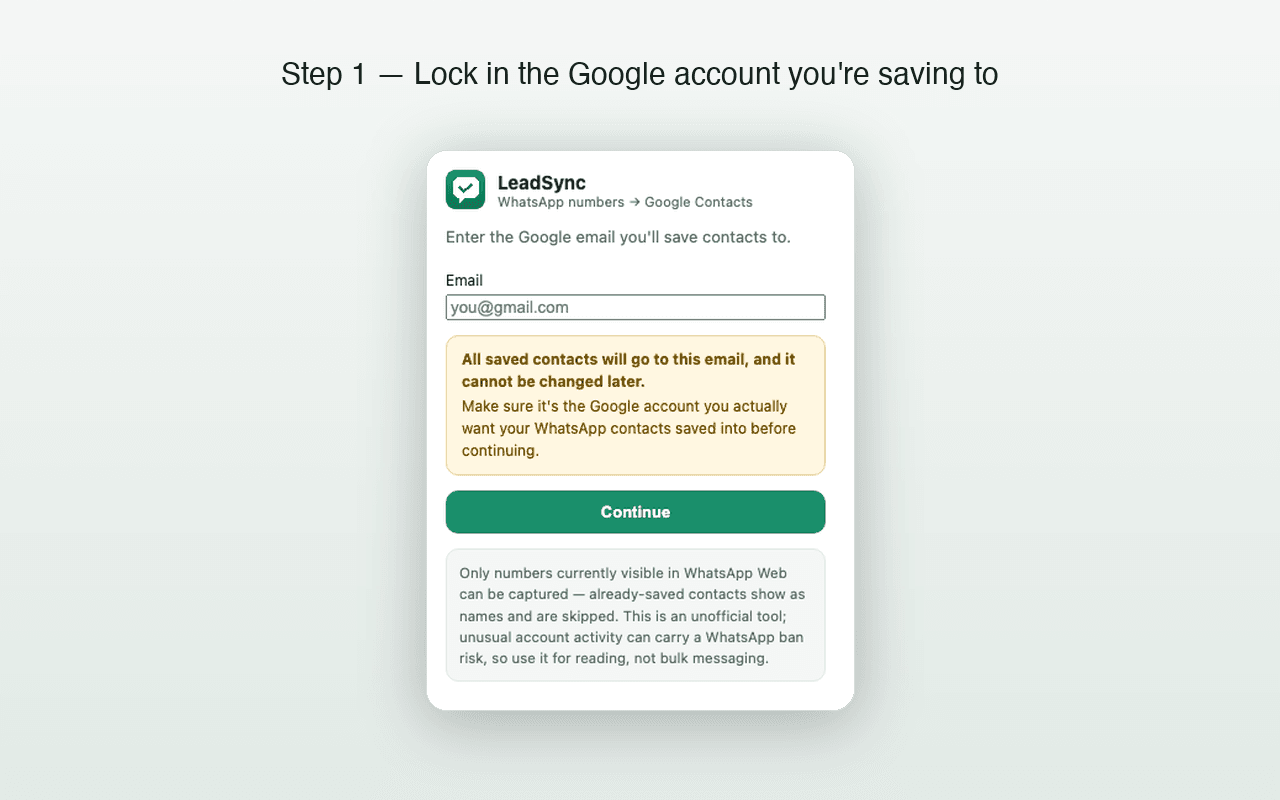
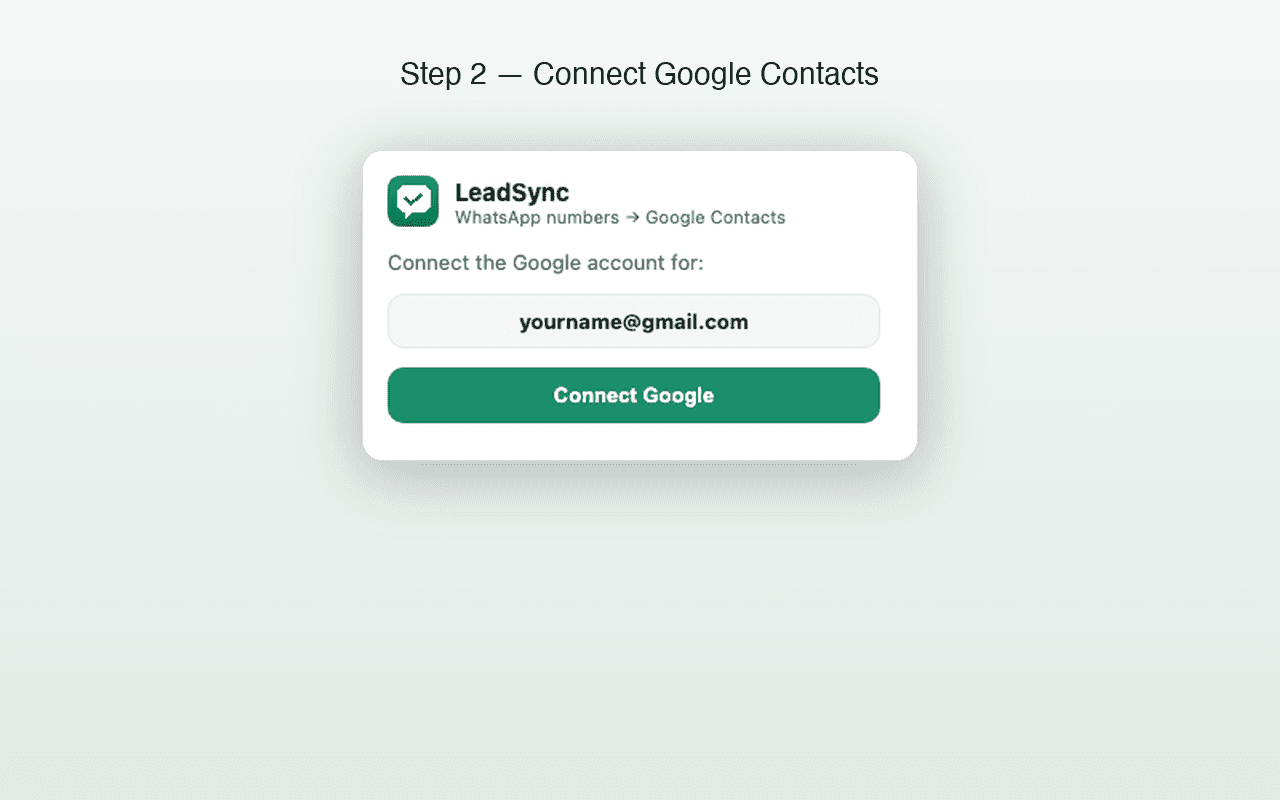
- 2
Connect your Google account
Sign in to the Google account where contacts should be saved.
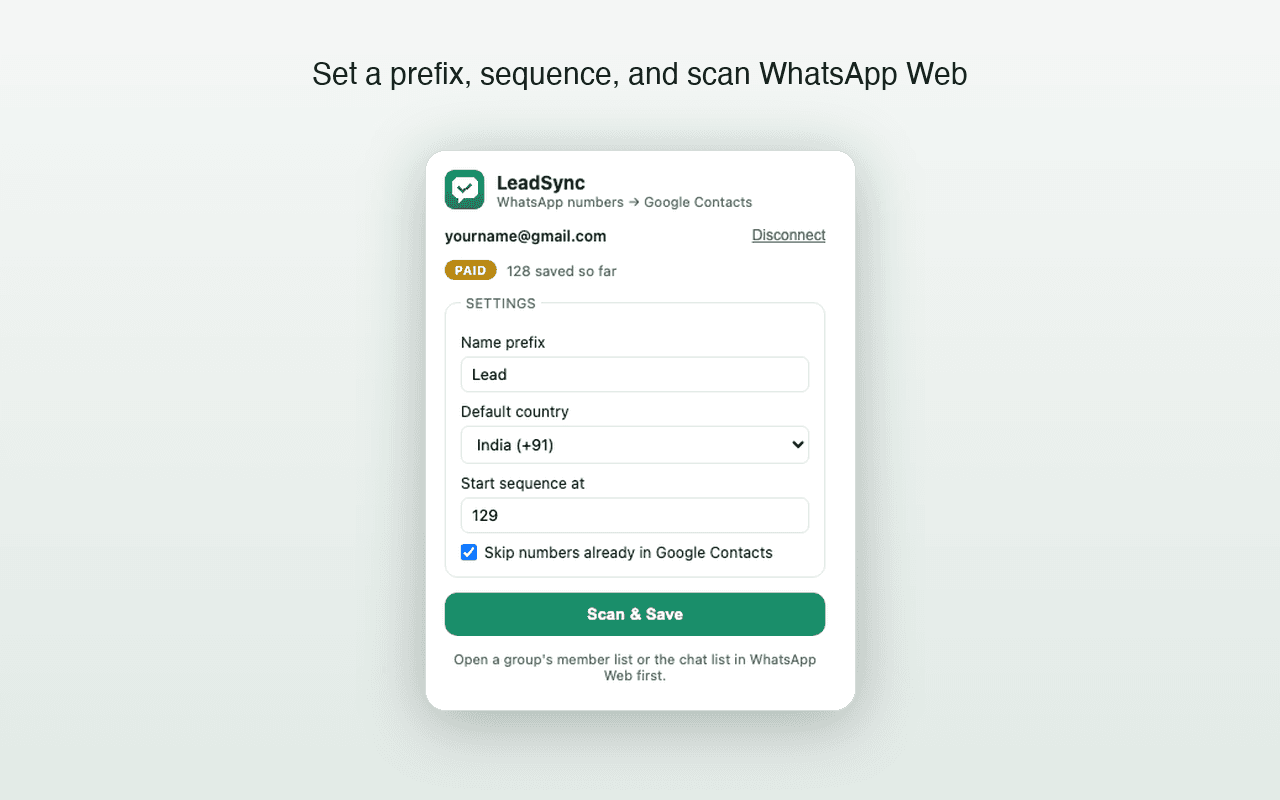
- 3
Open your chat list, hit Scan & Save
LeadSync scans the open chat list or group-member list and saves the new numbers it can see.
- 4
New numbers appear in Google Contacts
They sync to your phone automatically — nothing to import.
Version 1.3.0 scans the WhatsApp Web chat list or an opened group-member list. It can save only phone numbers that WhatsApp Web renders visibly.
Still saving WhatsApp numbers one by one?
You collect leads in chats, then lose an afternoon typing each number into Contacts — hoping you didn't add the same person twice. An auto WhatsApp number saver eliminates all of that.
Doing it by hand
- Typing every number into Contacts, one by one
- Losing track of who you've already saved
- Exporting a CSV you then have to import somewhere
- Worrying about where your data actually goes
With LeadSync
- New numbers saved straight to Google Contacts
- Duplicates detected and skipped automatically
- No files — contacts sync to your phone directly
- Read-only scanning that never leaves your device
Not another CSV export
LeadSync saves WhatsApp numbers straight into your Google Contacts — and they sync to your phone automatically.
From WhatsApp Web
- Unsaved chat contacts
- Chat list numbers
- Unknown numbers on screen
Into Google Contacts
- Named with your prefix
- Auto-sequenced
- Synced to your phone
Exactly what LeadSync writes to each contact
Honest expectations, set upfront — here's what lands in Google Contacts.
- Phone number
- International format, with the correct country code.
- Name
- Your custom prefix + an auto sequence number (e.g. Expo-Lead 001).
- Duplicate check
- Skipped automatically if the number already exists in your contacts.
- Source
- Only numbers visible in your open WhatsApp Web view.
LeadSync performs read-only scanning of what’s on your screen and never sends messages.
Built for people who collect numbers in WhatsApp
If your leads live in your WhatsApp chats, LeadSync turns them into a synced contact list.
Real-estate & property agents
Capture unsaved buyer and seller numbers from your WhatsApp chats.
Resellers & D2C sellers
Turn unsaved customer chat numbers into a clean, synced contact list.
Coaches & course creators
Save unsaved student and client numbers without typing a single one.
Recruiters & agencies
Pull unsaved candidate numbers straight from your WhatsApp chats.
Event & community admins
Move visible unsaved attendee chat numbers into Google Contacts without repeated manual entry.
Insurance, loan & field sales
Build a synced prospect book that's always on your phone.
LeadSync vs. the alternatives
Compare direct Google Contacts saving with file-based exports and manual entry. Features of third-party CSV tools vary by product.
| Capability | LeadSync | CSV / Excel exporters | Saving by hand |
|---|---|---|---|
| Saves directly to Google Contacts | Yes | File only | Yes, but slow |
| Syncs to your phone automatically | Yes | No | Yes |
| Duplicate detection | Automatic | Partial | None |
| Custom naming & sequence | Yes | No | Manual |
| On-device & private | Yes | Varies | Yes |
Saves directly to Google Contacts
- LeadSync
- Yes
- CSV / Excel
- File only
- By hand
- Yes, but slow
Syncs to your phone automatically
- LeadSync
- Yes
- CSV / Excel
- No
- By hand
- Yes
Duplicate detection
- LeadSync
- Automatic
- CSV / Excel
- Partial
- By hand
- None
Custom naming & sequence
- LeadSync
- Yes
- CSV / Excel
- No
- By hand
- Manual
On-device & private
- LeadSync
- Yes
- CSV / Excel
- Varies
- By hand
- Yes
Start 100% free — save your first 35 contacts, no card required.
Try the full workflow on the free tier. Upgrade to lifetime access only when you need to save more.
Start free. Upgrade once, keep it for life.
No subscriptions — pay a one-time fee for the number of Google accounts you need. Each account is locked to one WhatsApp number.
Save up to 35 contacts · no card required. Try the full workflow, then upgrade only when you need more.
- Save up to 35 contacts, free
- Automatic duplicate detection
- Custom name prefix & sequencing
- Saves straight to Google Contacts
1 account · 1 WhatsApp number
- Unlimited contact saves
- Custom name prefix & sequencing
- Automatic duplicate detection
- 1 Google account, locked to 1 WhatsApp number
5 accounts · 5 WhatsApp numbers
- Unlimited contact saves
- Custom name prefix & sequencing
- Automatic duplicate detection
- 5 Google accounts — 1 WhatsApp number each
7 accounts · 7 WhatsApp numbers
- Unlimited contact saves
- Custom name prefix & sequencing
- Automatic duplicate detection
- 7 Google accounts — 1 WhatsApp number each
10 accounts · 10 WhatsApp numbers
- Unlimited contact saves
- Custom name prefix & sequencing
- Automatic duplicate detection
- 10 Google accounts — 1 WhatsApp number each
Secure checkout via Razorpay · prices in INR · 3-day refund window · you'll enter each account's Google email and WhatsApp number on the next step.Secure checkout via Dodo Payments · prices in USD, local taxes added at checkout · 3-day refund window · you'll enter each account's Google email and WhatsApp number on the next step.
No invented reviews. Just how LeadSync actually works.
We'll feature genuine Chrome Web Store reviews here as they come in — never fabricated ones.
Read-only
Never sends messages
On your device
No contact data sent to LeadSync
Google People API
Your own sign-in
Syncs to phone
Android & iPhone
Used LeadSync? Leave an honest review.
Saved once, everywhere your Google account is
Because contacts live in Google — not a file — they show up on every device signed in to your account.
Is there a free version?
Yes — you can save up to 35 contacts for free, with no card required. One-time paid plans start at ₹499 for unlimited saves.
Does my WhatsApp data get sent to your servers?
No. All scanning happens locally in your browser. Numbers go only to your own Google Contacts via Google's own API, using your own Google sign-in. We don't operate servers that receive, store, or process your contacts or WhatsApp data.
Is LeadSync affiliated with WhatsApp or Google?
No. LeadSync is an independent, unofficial tool and is not affiliated with, endorsed by, or connected to WhatsApp Inc., Meta Platforms, or Google LLC.
How do the 5 / 7 / 10-account plans work?
Pick a plan, then for each account enter its Google email and the WhatsApp number it will be used with, and pay once. Every account unlocks immediately. Each account is locked to one WhatsApp number, so choose the plan whose account count matches how many numbers you run.
Do the saved contacts really sync to my phone?
Yes. Because contacts are written into Google Contacts (not exported to a file), any phone signed in to that Google account — Android or iPhone — receives them through normal Google contact sync.
Will it create duplicate contacts?
No. Before saving, LeadSync checks the numbers already in your Google Contacts and skips any that match, so you only ever add what's genuinely new.
Does this work for WhatsApp group chats?
Yes. In version 1.3.0, open a group's member list in WhatsApp Web and choose Scan & Save. LeadSync scrolls the rendered member list and saves visible phone numbers that are not already in the connected Google Contacts account. It cannot recover numbers WhatsApp displays only as saved names or otherwise does not render.
Can I get a refund?
Yes — if LeadSync doesn't work as described, you can request a full refund within 3 days of payment. See our Refund Policy for details.
Looking for something more specific? 170 questions answered · Documentation · Privacy & permissions
Turn WhatsApp chats into Google Contacts — free to start.
Install LeadSync, connect Google, and let your leads sync to your phone automatically.
35 contacts free · 3-day refund on paid plans